


The Sims™ FreePlay
4.4360.02K Reviews
App Specs
- Version
- 117.0.278544
- Updated On
- License
- Free
- Downloads
- 10,000,000+
- Developer
- ELECTRONIC ARTS
- Categories
- Simulation
- Platform
- Android, iOS
Screenshots

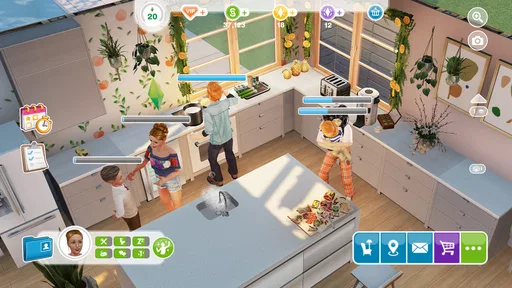
 Analysis by AppCompare
I first reached for this mobile life simulator when I wanted something creative to dip into between other things, rather than a game demanding a long, uninterrupted session. It gives me a little town to shape and a collection of Sims whose routines I can steer, so even a short visit can have a purpose. The appeal is not simply watching characters go about their day; it is deciding what their homes, relationships, and goals should look like.
The Sims™ FreePlay is a free simulation game from ELECTRONIC ARTS, and its long-running mobile format shows in the way it mixes building, character customization, tasks, and waiting. It has a 4.4 average from around one million ratings and more than ten million installs, which makes it a familiar choice in the genre. I’d recommend it most to people who enjoy planning a town gradually. If you want constant action or instant rewards, its pace may feel like a poor fit.
The Magic of Simulating Life
Let’s kick things off by talking about what The Sims™ FreePlay brings to the table. Unlike the PC version, this mobile adaptation is all about real-time progress. That means if your Sim’s baking a cake, you’re gonna be waiting around for it to finish—unless you’re willing to shell out some LP (that’s Lifestyle Points for the uninitiated). It’s like watching your real-life oven or waiting for your laundry to finish. Riveting, I know.
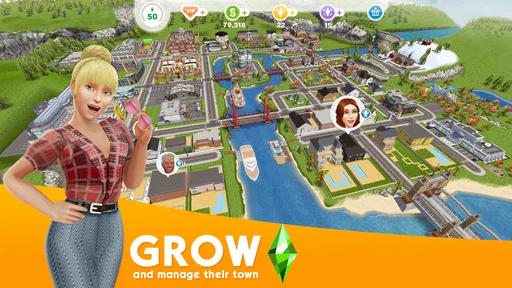
The game starts you off with a small plot of land and a single Sim. From there, you get to build your dream town, unlocking new areas and features as you level up. The more Sims you have, the more chaos you can create. And isn’t that the dream?
Building and Customization
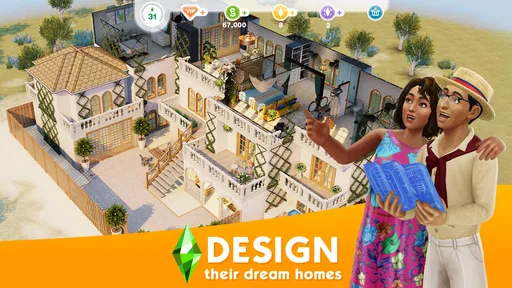
One of the major draws of any Sims game is the building and customization. The Sims™ FreePlay doesn’t disappoint in this department. You can design houses from the ground up, choosing everything from the layout to the wallpaper. Want a mansion with a pool? Go for it. Prefer a tiny, cozy cottage? That’s an option too. The level of detail you can achieve is pretty impressive for a mobile game.
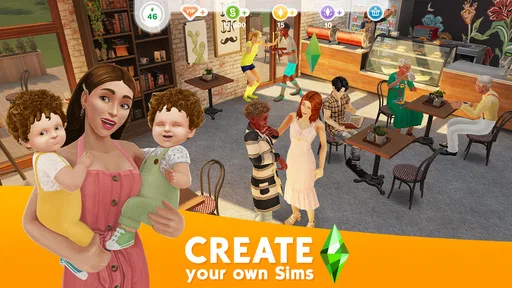
And let’s not forget about the Sims themselves! You can customize everything from hairstyles to outfits, letting your creativity run wild. Whether you want to create a Sim that looks just like you or one that embodies your alter ego, the possibilities are endless.
Social Interactions and Events
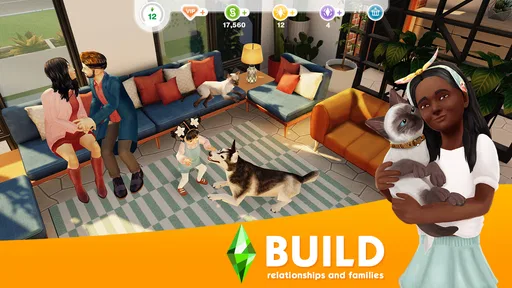
Now, what would life be without a little socializing? The Sims™ FreePlay has you covered. You can throw parties, visit neighbors, or even start a family. The social interactions are key to advancing in the game as they unlock new quests and events.
Worth Reading Before You Choose

EA SPORTS FC Mobile 26 Is a Bigger Football Game, but It Takes Time

Flipboard Shows What News Apps Must Do Beyond the Feed

Switching to Android Auto Means Rethinking Your Driving Routine

Google Calendar Makes a Crowded Week Easier to Manage

Ludo King Makes the Most of the Minutes Between Plans

Baby Panda World Brings Quick Play to Modern Phones, but Its Game Library Feels Busy
Speaking of events, the game keeps things fresh with seasonal and limited-time activities. Whether it’s a spooky Halloween party or a festive holiday celebration, there’s always something happening in Sim Town. These events are a great way to snag some exclusive items and keep the gameplay exciting.
Quests and Challenges
If you’re someone who thrives on structure and goals, you’ll appreciate the quests and challenges scattered throughout the game. These tasks range from simple (like baking cookies) to more complex (like solving mysteries). Completing them not only helps you progress but also rewards you with valuable resources.
Quests are a fantastic way to guide new players through the game’s mechanics and also provide a sense of accomplishment. Plus, who doesn’t like ticking things off a to-do list?
Real-Time Gameplay
Alright, let’s talk about the elephant in the room: the real-time gameplay. This feature is a double-edged sword. On one hand, it adds a layer of realism and urgency to your actions. On the other hand, it can be a bit of a drag when you’re waiting hours for tasks to complete. However, with a little patience and strategic planning, it’s manageable.
Luckily, the game offers ways to speed up the process, like using LP or watching ads. It’s a classic trade-off between time and money, but hey, at least you’ve got options.
Planning Around a Busy Day
The real-time rhythm works best when I treat tasks as things to queue around my day, not as a reason to keep checking the screen. Before stepping away, I choose an action that can make progress while I’m busy; when I return, I collect the result and decide what to set up next. That makes the game fit a commute break or a quiet moment at home without turning every unfinished task into an emergency.
A useful habit is to think about the next visit before starting a long wait. If I know I’ll be away for a while, I can pick a task with that gap in mind, while a brief session is better spent on a quick objective or arranging a room. This is less about optimizing every minute than avoiding the frustration of opening the game with no useful next step. The trade-off is clear: real-time tasks give the town a steady rhythm, but they can interrupt a player who wants immediate, continuous play.
In-Game Purchases
Speaking of spending, let’s touch on in-game purchases. Yes, they’re there, and yes, they can be tempting. While The Sims™ FreePlay is free to download and play, there are plenty of opportunities to spend real money. Whether it’s buying more Simoleons (the game’s currency) or unlocking special items, the choice is yours.
That said, it’s entirely possible to enjoy the game without spending a dime. With a bit of patience and dedication, you can achieve a lot through gameplay alone. But if you’re in a rush or just want to support the developers, the option is always there.
Spending, Patience, and Fairness
The purchase range is $0.99 to $99.99 per item, so I would treat optional spending as a budget decision rather than a shortcut to assume I need. The game is free to start, but waiting can make a purchase feel attractive when I want a build or task finished right away. My practical advice is to decide in advance whether you are comfortable paying to save time, and not make that decision while impatiently watching a timer.
I see this as a single-player-style creative experience rather than a contest where spending proves who is better. Social features and visiting neighbors add a people-facing element, but the core appeal is making your own town and pursuing its goals. That means a player who avoids purchases can still approach the game as a gradual building project; a player who values fast access may find the waits more irritating. The available purchase facts establish that items can be bought at different price points, but they do not establish the exact contents or value of each option, so I wouldn’t promise that any one purchase is necessary or worthwhile.
How It Fits Among Life Sims
Compared with a more open-ended life simulator on a computer, FreePlay is shaped around mobile sessions, guided tasks, and progress that continues in real time. That structure gives me clear reasons to return, but it also means I can’t expect every activity to resolve on demand. Compared with a quick puzzle or arcade game, it asks for more patience and offers more room to personalize homes and characters. If your priority is uninterrupted play, a game built around short rounds is likely a better match; if you like revisiting a world you have gradually arranged, this one has a stronger pull.
It also suits different moods in a way I appreciate. Some days I want to focus on a house layout; other days I would rather follow a quest and let it tell me what to do next. I wouldn’t recommend treating every limited-time activity as an obligation, though. If an event clashes with your schedule, the game is more enjoyable when you choose the goals that matter to you instead of trying to complete everything. That small change helps keep a relaxing hobby from feeling like another checklist.
Who Will Enjoy It—and Who May Not
I’d point a friend toward FreePlay if they enjoy arranging interiors, inventing character backstories, and making small amounts of progress over several visits. It can be a good fit for someone who wants a creative mobile game they can check between daily routines. For example, after breakfast I might assign a Sim a longer task, then return later to collect the result and spend a few minutes improving a room. That is a satisfying loop when I’m happy to let the game move at its own pace.
I’d steer away from it if you dislike timers, want every session to deliver a complete story arc, or feel pressured by optional purchases and limited-time events. It is also not the best choice for someone who wants a detailed, uninterrupted building session every time they open a phone game. The Teen content rating is worth considering for families choosing games together, while parents should make their own decision about purchases and play habits. The game is currently version 112.0.0 and supports Android 7.0 or later; those details are useful to check against an older device before installing.
What to Expect Before You Start
One fair question is whether it is enjoyable without paying. My answer is that the free entry point and gradual goals make that a reasonable way to try it, provided you accept waiting as part of play. Another is whether it works for a quick check-in: yes, that is where its mobile pacing can feel natural, though a short visit will not necessarily finish a longer activity. If you would rather play in one sitting, the same design can feel restrictive rather than convenient.
New players should also decide what they care about first. If building is the draw, spend early attention on how you want your town and homes to look; if goals keep you motivated, follow the quests that introduce systems and give your sessions direction. I find it helpful to avoid starting several things just because they are available. A clear next objective makes returning feel purposeful, and it reduces the sense that progress depends on constant checking.
Final Thoughts
All in all, The Sims™ FreePlay is a solid adaptation of the classic Sims experience, perfectly suited for mobile play. It captures the essence of life simulation while offering a unique twist with its real-time mechanics. Whether you’re a seasoned Sims veteran or a newcomer looking for a fun way to pass the time, this game has something for everyone.
So, ready to dive into the world of The Sims™ FreePlay? Grab your phone, start building your dream town, and let the chaos begin!
My Verdict on Trust and Value
For me, the fairest way to approach FreePlay is to see it as a free-to-start town-building game whose main cost, even before money enters the picture, is patience. The price range for in-app items is broad, so I’d avoid tapping through a purchase simply because a task is taking longer than I hoped. If a specific item catches your eye, check its price and decide whether it fits your own budget; don’t assume spending is required to enjoy the creative side.
Released on February 14, 2012, the game has had a long life on mobile, and its current version is 112.0.0. Its Teen rating, free price, and established player base make it easy to understand why people give it a try, but they do not guarantee that its timers will suit everyone. My trust verdict is straightforward: I’m comfortable recommending it to patient players who like gradual customization and clear goals. I’d suggest a different kind of game to anyone who wants instant progress, dislikes purchase prompts, or would rather spend a session playing without waiting.
Pros
- Engaging real-time gameplay experience
- Customizable characters and homes
- Frequent updates with new content
- Large community and social features
- Free to play with optional purchases
Cons
- Requires constant internet connection
- In-app purchases can be pricey
- Long wait times for tasks
- Graphics are not high resolution
- Limited offline functionality
FAQs for The Sims™ FreePlay
What is The Sims™ FreePlay and how does it differ from other Sims games?
The Sims™ FreePlay is a mobile version of the popular life simulation game series, specifically designed for iOS and Android devices. Unlike its PC counterparts, FreePlay offers real-time gameplay, meaning actions take real-world time to complete. It’s free to play, but includes in-app purchases for premium content and quicker progression.
Is The Sims™ FreePlay free to download and play?
Yes, The Sims™ FreePlay is free to download and play. However, it includes in-app purchases that allow players to buy Simoleons, Lifestyle Points, and Social Points. These purchases can enhance gameplay by speeding up tasks or unlocking exclusive content, though they are not necessary to enjoy the full experience.
What are the device requirements for The Sims™ FreePlay?
The Sims™ FreePlay requires a device running on Android 4.4 or later, or iOS 9.0 or later for Apple devices. It’s recommended to have a stable internet connection as the game frequently updates content and requires online connectivity for certain features. Ensure your device has sufficient storage space for the game and updates.
Can I play The Sims™ FreePlay offline?
No, The Sims™ FreePlay requires a constant internet connection to play. This is due to the game’s need to sync data with the server, access online features, and download updates. Players need to ensure they have a stable internet connection to enjoy a seamless gaming experience.
Are there any social features in The Sims™ FreePlay?
Yes, The Sims™ FreePlay includes social features that allow players to connect with friends. You can visit your friends’ towns, complete social tasks, and earn Social Points. Connecting with friends can enhance your gameplay experience and provide additional rewards within the game.


